The four events that trigger the acknowledgement process
What you need to record when an employee acknowledges a policy
Managing non-material changes to policies
Why and how SharePoint can simplify policy acknowledgement
Prefer to speak to us about our approach to Policy acknowledgement?Book a short call with one of our team to get answers to your questions.
Policy management series
Policies and controlled documents play a vital role in your organisation’s governance, risk, and compliance (GRC) strategy. In this article, we discuss Policy Acknowledgement, a crucial part of the Policy Management Lifecycle.
This series explores the key considerations at each stage of the policy lifecycle.
Prefer video? No problem, watch a short video on Policy Acknowledgement instead.
What is policy acknowledgement?
Policy Acknowledgement, also known as Policy Attestation, involves verifying that employees have read, understood, and agreed to follow your company policies. This process ensures compliance by maintaining an accurate record of acknowledgement.
For many new employees, the first example of Acknowledgement is signing the company handbook, traditionally with a pen (a wet signature). More recently, eSignature tools like DocuSign or Adobe Sign are more common, along with specialised policy acknowledgement solutions.
What triggers an acknowledgement request?
New Joiners: A new employee typically signs the company handbook, which mainly includes HR, IT and data governance policies. In certain sectors, such as finance, additional industry-specific policies will need to be attested to.
Change in Role: When an employee's role changes, they may need to attest to new policies relevant to their new responsibilities.
Change in Policy: Any updates or changes to existing policies require employees to re-attest to ensure they are aware of and agree to the new terms.
After a Period of Time: Your organisation may require employees to re-attest to policies periodically, such as every two years.
Non-Material Change: If a policy is updated to correct a formatting error or provide additional clarity without altering the policy's meaning, Acknowledgement may not be necessary.
It's important to note that requesting Acknowledgement involves overhead. Employees need time to read and understand the policy, and administrators must track and follow up with those who haven't completed the Acknowledgement.
How to record policy acknowledgement
Your goal is to ensure you accurately record and can evidence:
The policy that has been agreed to.
The version of that policy that has been agreed to.
The date when it was agreed to.
In addition to holding a copy of the Acknowledgement centrally, the person attesting to the policy should also have access to a copy for their records.
The most common approaches are as follows:
eSignatures: Familiar to most, yet difficult to manage in large numbers. While efficient for small-scale Acknowledgements, handling large volumes can require significant administrative effort.
Dedicated Digital Solution: Specialised platforms (SaaS) designed to handle policy Acknowledgements. They typically offer audience targeting, automated reminders, and tracking capabilities.
As part of a Policy Management Solution: Integrating Acknowledgement within a broader policy management solution ensures that you maintain a single version of the approved policy and centralised management for administrators over creation, approval workflows, and review reminders, providing a holistic approach to policy management.
With Policy Express, our solution for SharePoint Policy Management, you can maintain a central record of acknowledgements, ensuring all policies are version-controlled and accessible.
Why use SharePoint for policy acknowledgement
SharePoint integrates with your digital user directory, Microsoft Entra (previously Active Directory), this helps you minimise the risk of employees being missed as they are not being manually synchronised across two disparate systems.
Additionally, some solutions, such as Policy Express, also allow the use of directory groups that have already been set up.
Using SharePoint for policy acknowledgement
Approvals Approach
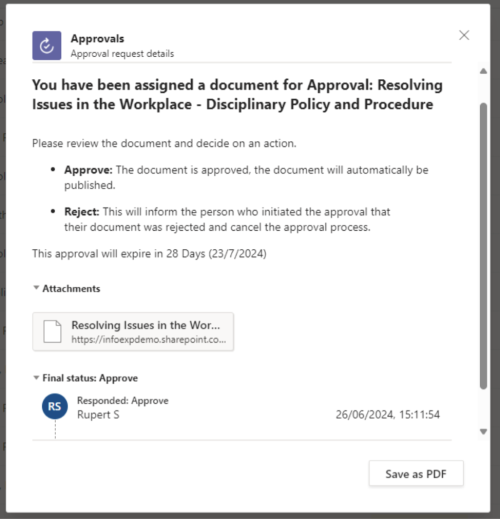
Microsoft Approvals is an “out-of-the-box” feature included in Microsoft 365, it allows you to issue a document, or Policy in this case, to another user, whereby they receive a notification to complete the approval.
Approvals Process showing an attested policy in SharePoint
This approach is quick to start with and may work for small organisations, but faces the following challenges:
No centralised reporting
Approvals time out after 30 days
No automated copy of the approved policy
Cannot issue acknowledgements to Groups of users
The term “approvals” is fixed, it can’t be updated with “Acknowledgement” You could take this a step further with the Microsoft eSignature solution. Note there is a cost attached to this and the term “Approvals” remains.
Power Platform + SharePoint Approach
By creating an application within the Power Platform, we’re still in the secure environment of Microsoft 365, utilising Entra/Azure Active Directory for user authentication and integrating with SharePoint for document management.
This approach enables us to:
Distribute to multiple users and groups
Take a copy of the attested policy at the point in time of issue
Separate Policy Acknowledgements from other work tasks
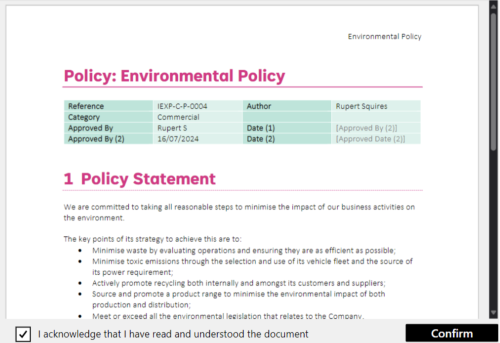
Provide a view of the document on the acknowledgement screen
Provide reporting on both policies awaiting acknowledgement and those which have been approved.
Power App for Policy Acknowledgement – Part of Policy Express
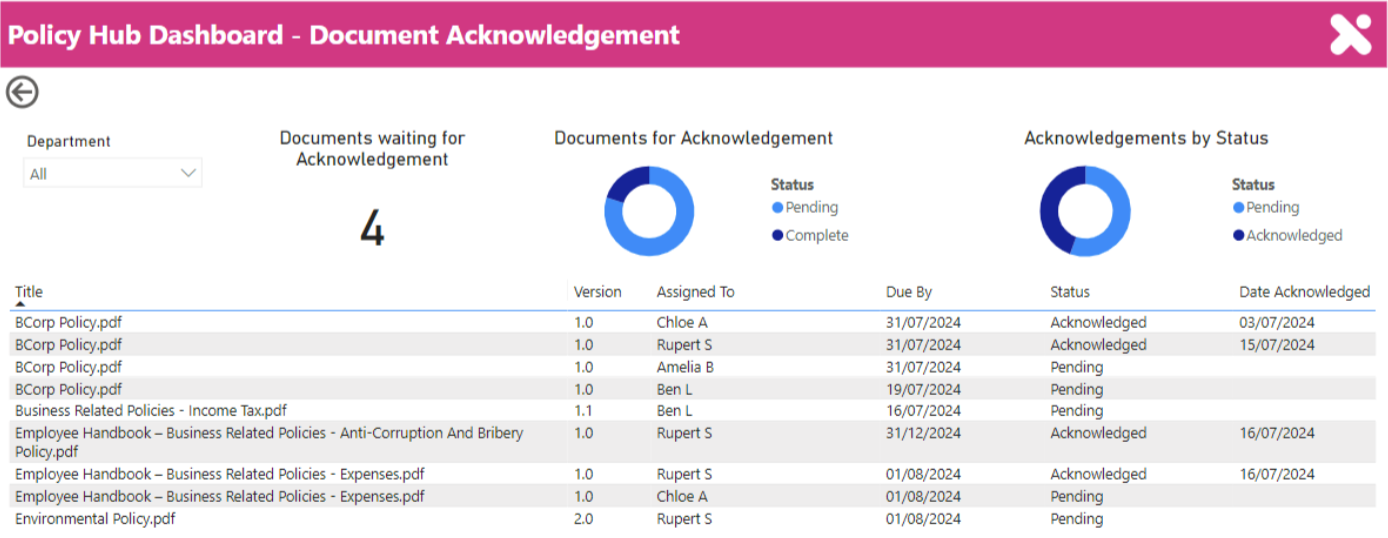
The other advantage of using an app is that the request and audit data is available to report on using Power BI, an example of this is shown below.
Policy Acknowledgement Reporting in Power BI – Part of Policy Express
Although this is a comprehensive solution, configuring SharePoint and Power BI requires technical knowledge and time. If you want to move faster, Policy Express is a fixed-fee solution and can solve these familiar challenges, all within Microsoft 365.
Many organisations see the value of managing Policy Acknowledgement, but the implementation needs more consideration. Here's a simple three-step plan to shape your Policy Acknowledgement implementation:
Preparation and Planning: Consider the hand-off or integration between the Policy Approval Process and the Policy Acknowledgement system. Identify the Acknowledgement audiences and the trigger event to start the process.
Implementation: Integrate with your primary digital directory (e.g., Microsoft Entra) to ensure all employees are included. Communicate the process clearly to all staff, providing training if necessary. Ensure that the system’s email address is on the “Allow List.”
Monitoring and Review: With automation, the administration process moves to managing exceptions and chasing those who haven’t completed the requested Acknowledgement. Consider an "Exec Dashboard" to demonstrate performance to leadership.
Need help with policy acknowledgement in SharePoint?
Manually capturing Acknowledgements, assigning them to the right person, tracking review schedules, and understanding different rules for various policies is time-consuming for managers.
Policy Express for SharePoint Online offers a platform that can support you to:
Full Policy Management Lifecycle: Creation, approval workflows, publishing, feedback and reviews are covered
Directory Integration: Use Microsoft Entra groups to manage sending Acknowledgements at scale, and prevent employees being missed out.
Manage Reporting: Integrate with Power BI to generate comprehensive reports.
See how Policy Express can streamline your policy acknowledgement process and enhance your governance framework in this short explainer video.