We’ve just launched new features to help you work smarter!
Check them now!

Prefer to speak to us about our approach to Policy approval? Book a short call with one of our team to get answers to your questions.
Policies and controlled documents play a vital role in your organisation’s governance, risk, and compliance (GRC) strategy. In this article, we discuss Policy Approvals, the various approval steps and considerations for delegated / board approvals as well as handling non-material changes.
Policy Express, our solution for SharePoint Policy Management, automates this process, ensuring compliance and reducing administrative effort.
This series explores the key considerations at each stage of the policy lifecycle.
Prefer video? No problem, watch a short video on Policy Approval instead.
In your organisation, a risk, legal requirement, or standard has been identified, and it has been determined that addressing it with a documented company policy is necessary. This approval requirement can be broadened to include Controlled Documents such as Standard Operating Procedures (SOPs), templates, and forms.
Examples of Policies Include:
After a policy has been drafted and consulted upon, it requires agreement from the relevant decision-makers to be confirmed. This typically involves a multi-stage process including input from departmental experts, the head of Quality/Governance, Risk, and Compliance (GRC), and board or committee approval.
Throughout this process, the organisation must track and provide evidence of the approval trail to ensure compliance.
Manually tracking approvals via paper or email is prone to errors and can be time-consuming for quality managers to execute and evidence during an audit. Additionally, policy owners often spend excessive time chasing re-validations, leading to wasted administrative effort.
SharePoint Online offers built-in approval automation capabilities. The "Request sign-off" feature provides a simple and user-friendly approach with several benefits:
However, there are some disadvantages to the "Request sign-off" feature:
To enhance the Document Approval capabilities, Microsoft’s workflow automation platform, Power Automate, can be used to create a customised approval process. This allows for:
Policy Express, our solution for SharePoint Policy Management, enhances these workflows, providing audit trails and customisable approval stages.
While Power Automate is marketed as accessible to "power users," experience shows that you may quickly require the assistance of a Power Automate expert.
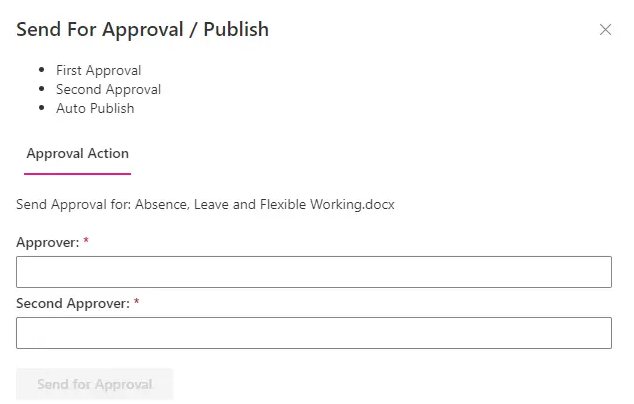
For a Policy Approval Process, you need to consider:
Roles:
Low-Risk Content
For controlled documents that are deemed low-risk, a single-step approval may be sufficient.
Non-Material Changes
For non-material changes, the policy owner may be authorised to issue updates without undergoing the full approval process.
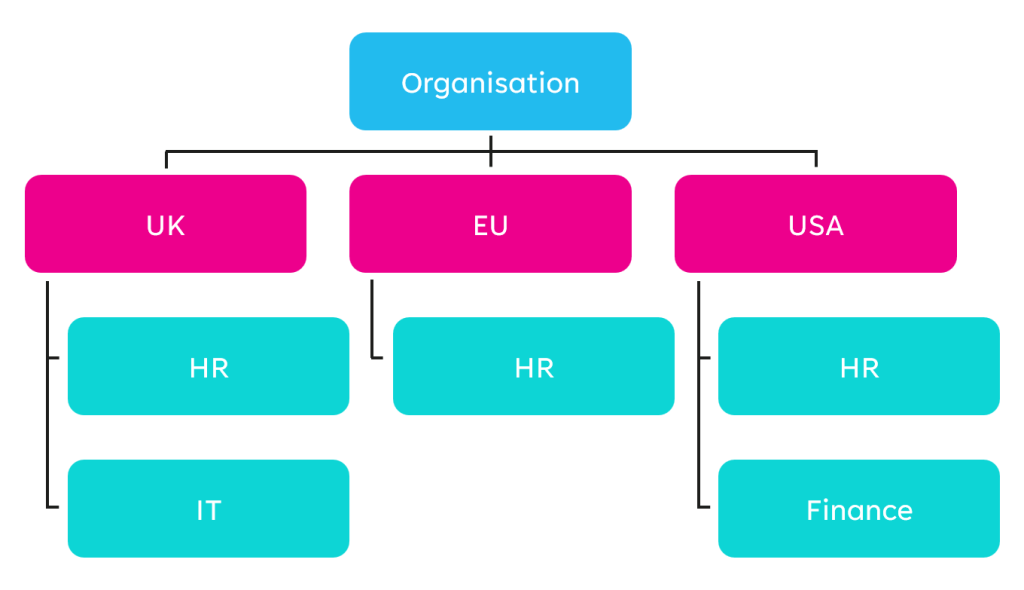
Jurisdictions / Departments:
When multiple departments or jurisdictions manage their policies, different processes may need to be defined for each variation.
Multiple Signatories
In some cases, multiple signatories may be required for a policy stage to be completed, rather than just one.
When designing Policy Approval Steps, consider the following questions:
Who Can Approve the Stage?
How Many People?
Following Step Completion:
On Completion of the Process:
Policy Express, our solution for SharePoint Policy Management, simplifies creating approval workflows tailored to your specific requirements.
Organisations operating in various jurisdictions may need to tailor processes according to each jurisdiction's requirements. However, departments within a jurisdiction might follow the same process while involving different stakeholders.
Policies are often finalised in a committee or board meeting, as seen in both charities and regulated industries such as banking. Should each board member receive a workflow notification to capture their approval of a policy?
In our experience, decisions made during board meetings are typically documented in the minutes, which are then ratified at the next meeting. Therefore, a board representative can complete the approval workflow on behalf of the board. This approval process should be documented by a representative of the committee.
Using an eSignature tool like DocuSign or Adobe Sign for Policy Approval is beneficial, especially where regulatory compliance, such as in Healthcare in the UAE, requires it.
While Microsoft 365 offers robust authentication and audit trails for most organisations, eSignature tools provide enhanced security, convenience, and legal validity for signing policies remotely and meeting specific regulatory requirements.
In most organisations, the policy approval process is established before the technical solution, given that:
We offer a fixed-fee solution, Policy Express, to automate and record the approval process.
Many organisations can map their existing process to the functionality of our Policy Express solution.
If your needs are more complex, then a consultancy approach can be taken, using our Policy Express solution as a starting point, we’ll work with you to deliver a bespoke solution on a fixed-fee basis.
See how Policy Express can streamline your policy approval process and enhance your governance framework in this short explainer video.





.jpg)