We’ve just launched new features to help you work smarter!
Check them now!

Prefer to speak to us about our approach to the policy review process? Book a short call with one of our team to get answers to your questions.
It is widely recognised that an effective policy review process is essential for ensuring that policies remain compliant with organisational needs. In this article, we discuss how to plan and implement a streamlined policy review process in SharePoint, taking into account the needs of various stakeholders.
This series explores the key considerations at each stage of the policy lifecycle.
Prefer video? No problem, watch a short video on Policy Reviews instead.
Policies provide governance over employee behaviour and decision-making across your organisation. Once drafted, Policies follow a formal approval process, covered previously, and are then published, often with the help of a Policy Management Solution.
Typically, once a policy is approved, that action triggers a timeline for the next review, to ensure that 1 or 2 years down the line the policy is checked that it still achieves the necessary outcomes. That said, the scheduled review process isn't the only thing that can trigger a policy review.
Several factors might call for an earlier policy review, such as:
As a consultancy, we've frequently encountered clients facing the challenge of orphan policies - those without a valid owner or any owner at all. Identifying these policies early is crucial for effective governance.
Detecting leavers can be relatively straightforward. Using Policy Express for SharePoint, the solution generates a report that compares the policy owner with the list of active licensed users in Microsoft 365, highlighting any gaps.

It is more challenging to identify when an owner has changed roles and is no longer responsible for the policy. Ideally, policy ownership should transfer when the current owner relinquishes their responsibilities. However, as a safeguard, providing early awareness of the upcoming policy review should prompt the legacy owner to raise the issue with the overall policy administrator for reassignment. Again, Policy Express solves this by providing configurable reminders – typically starting 90 days out.
Using Policy Express, our solution for SharePoint Policy Management, organisations can easily generate reports identifying policies lacking ownership by comparing active users in Microsoft 365 with policy owners.
Many organisations follow a blanket rule for all policies, typically reviewing them every two years. However, in organisations with a more mature approach to policy management, we observe the following traits:
Sometimes, a policy that has been published passes its review date. The initial response from some is to remove these policies from the user view. However, with a bit more consideration, it's usually better to have an outdated policy in force than to have none.
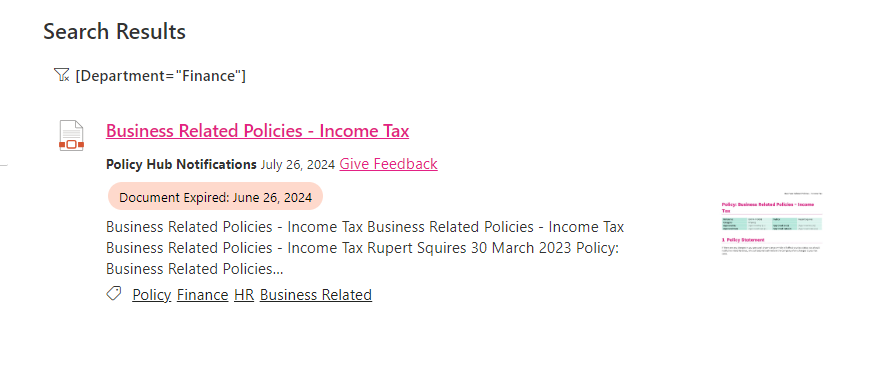
When a policy has passed its review date, a couple of actions should be taken:
1. The overall Policy administrator should be able to easily report on overdue policies.
2. End-users should be informed when accessing a policy that the review is overdue, as this may have implications for the policy's applicability.
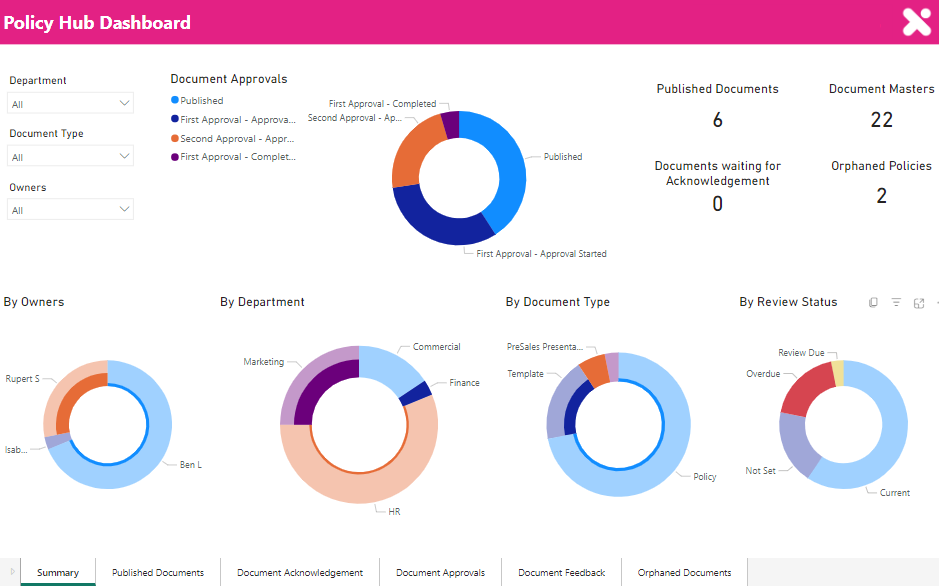
In most organisations, the policy review process often takes a backseat until the policy review is due or an ISO assessor's visit is scheduled! Here's a simple three-step plan to streamline your policy review process:
Manually capturing feedback, assigning it to the right person, tracking review schedules, and understanding different rules for various policies is time-consuming for quality managers.
SharePoint Online offers a platform that can support you to:
However, configuring SharePoint requires technical knowledge and time. If you want to move faster, Policy Express is a fixed-fee solution and can solve these familiar challenges, all within Microsoft 365.
See how Policy Express can streamline your policy review process and enhance your governance framework in this short explainer video.