We’ve just launched new features to help you work smarter!
Check them now!

Yes. SharePoint can be used as the foundation for policy management in Microsoft 365. It provides document storage, permissions, version history, metadata, search and integration with the wider Microsoft 365 environment including Copilot.
However, SharePoint does not provide a complete governed policy lifecycle out of the box. Most organisations need to add structure for policy creation, approvals, publishing, acknowledgement, review reminders, feedback, ownership tracking and compliance reporting.
That is the difference between storing policies in SharePoint and properly governing their lifecycle.
SharePoint policy management is the use of SharePoint Online as the central place to create, store, publish and manage organisational policies and procedures.
In practical terms, it means using SharePoint to control policy documents, manage permissions, maintain version history, support search and give employees one trusted place to find approved guidance.
The important distinction is that SharePoint provides document management, not complete policy governance. A policy is more than a file, it has:
Managing those things consistently is what separates a policy library from a governed policy lifecycle.
SharePoint is no longer just a document repository. In Microsoft 365, it is part of the content layer behind intranets, Teams, Microsoft Search, Viva and AI tools such as Microsoft Copilot.
That changes the risk. When policies are current, well structured and properly governed, employees can find trusted guidance quickly. When policies are duplicated, outdated or poorly controlled, the same tools can spread confusion faster.
AI makes this more important. Copilot and AI-assisted search depend on the content they can access. If policies are stale, inconsistently named or missing clear ownership, AI can surface guidance that looks authoritative but is no longer reliable.
That is why policy management is now part of digital trust. It is about whether people can rely on the information Microsoft 365 puts in front of them.
“Moving our policy management into Microsoft 365 with Policy Express has massively reduced admin effort and improved compliance confidence.”
Daniel Burgess, Aerogen
Policy governance is the control layer around a policy. It defines who owns it, how it is approved, where it is published, who needs to acknowledge it, when it must be reviewed and what evidence is kept.
Without governance, policies may still exist, but the organisation cannot reliably prove they are current, approved, understood or being maintained.
Where does policy governance break down?
Policy governance usually breaks down when the document exists, but the control around it does not.
Policy content often spreads across SharePoint sites, Teams channels, intranet pages, file shares, email attachments and departmental folders. Some versions are approved. Some are drafts. Some are out of date but still accessible. Others have been copied into several places, creating competing versions of the truth.
The impact is felt across the organisation:
The problem is rarely SharePoint itself. SharePoint is strong at storage, permissions, metadata, versioning and collaboration. The gap is that SharePoint does not automatically create a governed policy lifecycle.
Without defined ownership, process, automation and reporting, SharePoint becomes another place where policies accumulate.
Ungoverned policy content creates risk in five connected ways.
1. Weak audit evidence. In an audit, it is not enough to show that a policy exists. You need to evidence which version was active, who approved it, when it was published and who acknowledged it.
2. Unclear accountability. Every policy needs a clear owner. When ownership is informal or hidden, policies become orphaned. They stay visible, but nobody is actively maintaining them.
3. Loss of employee trust. If people find outdated policies, broken links or conflicting versions, they stop treating the policy library as a trusted source.
4. Operational inconsistency. Teams start applying different versions, interpreting requirements differently or building local workarounds.
5. Poor AI readiness. Copilot and AI-assisted search need clean, current and authoritative content. If policies are duplicated, poorly tagged or out of date, AI can return the wrong guidance with confidence.
SharePoint is usually the right foundation for policy content. It supports central storage, permissions, version history, metadata, search and Microsoft 365 integration. The gaps appear when a policy needs to behave as a controlled asset, not just a stored document.

Each gap can be patched with a workaround, but workarounds add complexity and maintenance. A governed policy lifecycle needs structure, automation and reporting layered on top of SharePoint.
Good policy management is not measured by how many documents sit in a library. It is measured by whether the organisation can answer the right governance questions quickly and confidently. A useful starting point is to treat the questions below as a health check for where your policy management stands today:
If these questions are difficult to answer, the issue is not usually the policy documents themselves. The issue is the governance around them.
A mature approach brings these answers together through a single searchable register, clear ownership, controlled publication, version-specific acknowledgement, structured feedback, automated reviews and useful reporting. The goal is not more bureaucracy. The goal is confidence.
A strong policy lifecycle gives every policy a consistent route from draft to review. It also ensures each stage leaves an evidence trail.

Together, these stages turn policies from static documents into managed organisational assets.
Watch our video on the policy lifecycle:
Policy governance starts before approval. It starts with how the policy is created.
If teams use different templates, naming conventions and document structures, policies become harder to search, approve, publish, report on and review.
Good creation practice includes:
A well-created policy should make the basics clear from the start: what it is, who owns it, which version it represents, when it takes effect, when it must be reviewed and who needs to act on it.
Policy Express supports this through templated document structures and reference numbers assigned automatically by department and type, so classification is built in from the start rather than applied inconsistently later.
Approval confirms that the right people have reviewed a policy and accepted it as the official position.
This is one of the most common failure points. Email-based approval is hard to control. Decisions get buried in inboxes, attachments separate from final versions and evidence is difficult to reconstruct later.
A governed approval process should provide:
Minor edits should not always force a full approval cycle, but they should still leave an audit trail.
Policy Express supports multi step approvals, delegated approvals and full decision records. Once approval is complete, it can convert the document to PDF and publish it to the policy hub automatically, removing bottlenecks and creating a far stronger audit record than email.
Publishing a policy is not the same as making people aware of it.
Employees rarely browse document libraries looking for policy updates. They need relevant guidance surfaced in the right place, at the right time.
A good awareness model uses several routes:
The important rule is that every route should point back to the governed source. Awareness should not create uncontrolled copies.
Policy Bot that let people ask questions in plain language. Awareness depends on trust: wherever a policy appears, it should link back to the single governed source rather than spawn an uncontrolled copy.
Some policies require formal evidence that an employee has read, understood and accepted a specific version.
This is policy acknowledgement, also called attestation. It creates a record connecting a named person to a specific version of a specific policy at a specific time.
Acknowledgement is usually triggered by events such as:
The key is version specificity. Knowing that someone acknowledged “the policy” is not enough if you cannot show which version they acknowledged.
Policy Express stores each acknowledgement centrally against the published version, allowing reporting by person, policy, version and date. Requests can be targeted to teams, departments or groups configured in Microsoft Entra, so joiners and leavers are managed through the same identity source you already use elsewhere.
Policies should improve as the organisation changes.
Without a structured feedback route, employees either say nothing, raise issues informally or build workarounds. Policy owners may only discover that a policy is unclear, outdated or impractical at the next review, or after something has already gone wrong.
A useful feedback process should capture:
business changes
Each item should be logged, routed to the owner and tracked through to a clear outcome.
Policy Express captures feedback through a structured Power Apps form embedded alongside each policy, logs it centrally, routes it to the owner and tracks it through to resolution.
A policy that was accurate two years ago may not be accurate today.
Review cycles keep policies relevant, compliant and useful. They usually happen in two ways:
When a policy is approaching review, the owner should be prompted before it becomes overdue. When a policy is overdue, that status should be visible to administrators and, where appropriate, to employees.
Keeping an overdue policy visible with a warning is usually better than removing guidance entirely. The important thing is that the organisation knows the policy needs attention.
Policy Express supports configurable reminders, typically starting 90 days before review, giving owners time to proactively act before a policy becomes overdue.
“One of the biggest benefits is the visibility. We can now see which policies are due for review and where bottlenecks are happening.”
Nick Till, Banyards
An orphan policy is a policy with no valid, active owner.
This usually happens when someone leaves the organisation, changes role or moves department without their policies being reassigned. The policy may still be published and visible, but nobody is clearly accountable for keeping it accurate, reviewing it or responding to feedback.
Orphan policies create a hidden governance risk. Employees may still rely on the policy, while the organisation has no active owner maintaining it.
A practical way to manage orphan policies is to:
Policy Express detects orphan policies by comparing policy owners against active licensed Microsoft 365 users. If an owner is no longer active, administrators are alerted so the policy can be reassigned.
The harder case is when the owner is still employed but no longer responsible for the policy. That is why ownership should also be confirmed during review, not only checked against user status.
“One of the best features is an automated alert for orphaned policies. This single feature justified the entire investment.”
Greg Ackerman, Precision Diagnostics LLC
SharePoint remains the right foundation for policy content in Microsoft 365. The real question is whether SharePoint alone gives you the governed lifecycle you need. The table below sets out the difference across each stage.
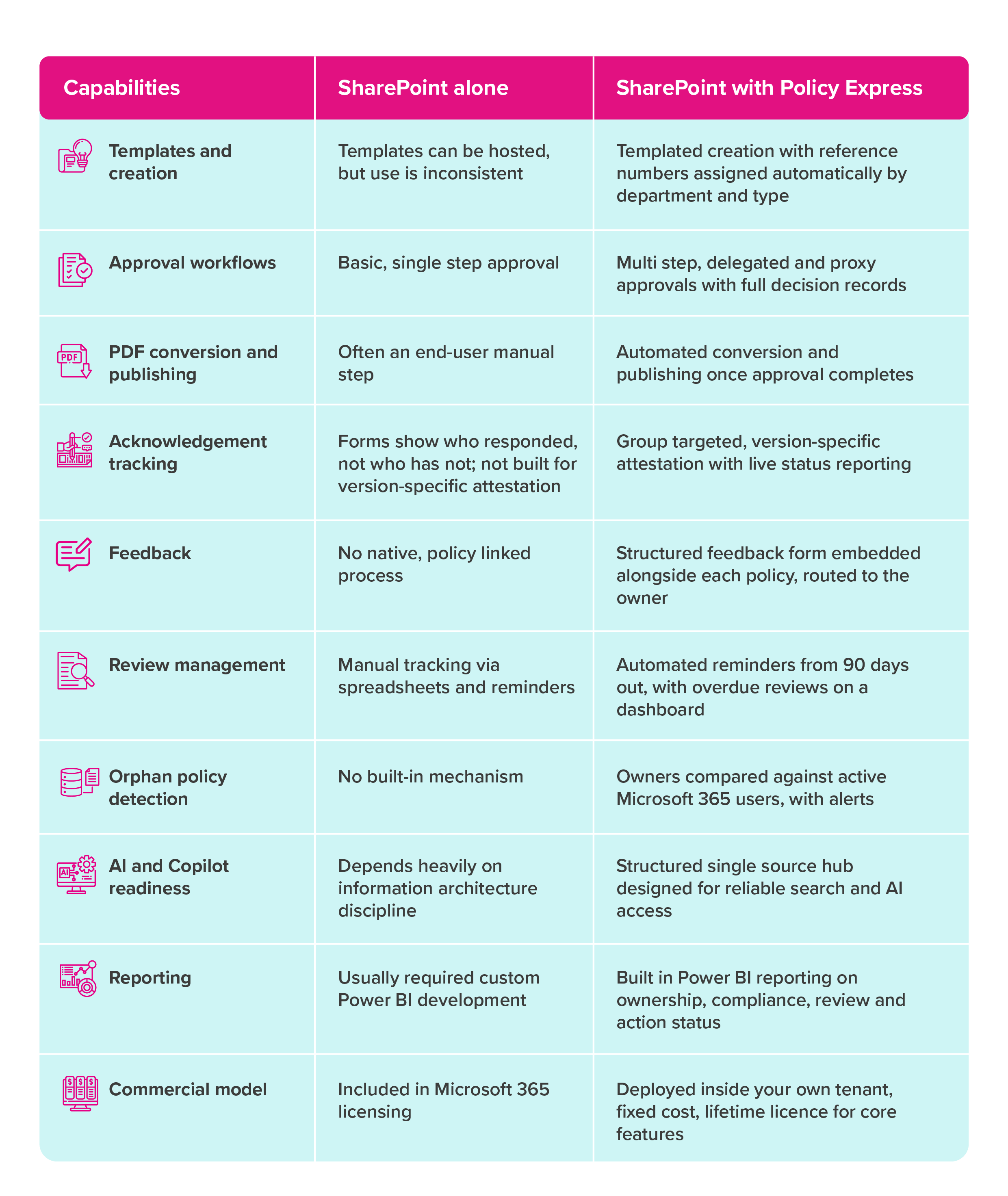
Copilot readiness is not only a technology issue. It is an information governance issue.
Copilot and AI-assisted search depend on the content they can access. That matters for policies because employees often ask questions that policies are meant to answer: working from home rules, expenses, supplier approval, data breach procedures or contractor requirements.
If policy content is duplicated, outdated or poorly governed, AI can surface incomplete or unreliable guidance, even when permissions are technically correct.
AI-ready policy content should be:
Policy governance helps create those conditions. It makes clear which policy is current, who owns it, when it was approved, when it needs review and where the governed version lives.
Policy Express supports this through controlled publication, versioning, Policy Bot, AI-generated summaries and a News Agent for awareness. The aim is simple: make policy content easier for people and AI tools to find, understand and trust inside Microsoft 365.
“Policy Express has transformed how we manage our policies. Having a single version of the truth is essential for Microsoft Copilot.”
Haseet Sanghrajka, City Dynamics
You do not need to transform policy management overnight. Progress usually comes in phases.
Step 1: Map where policy content lives. Look across SharePoint sites, Teams channels, intranet pages, file shares and departmental folders. Policies are often organised for the people who created them, not for the employees who need to find, understand and follow them.
Step 2: Define the single source of truth. Think consumer first. Approved policies need one governed home where employees know they can find the current version. Related procedures, forms and guidance can be referenced from the policy.
Step 3: Define the lifecycle. Agree how policies will be created, approved, published, communicated, acknowledged and reviewed and who by. Make controls proportionate; not every document needs the same process, but high-impact policies need tighter governance.
Step 4: Resolve ownership. Every policy gets a named accountable owner. Where possible, tie ownership to a role or function rather than only an individual, which reduces orphan risk when people move.
Step 5: Strengthen metadata. Tag policies consistently by department, topic, owner, audience, review date and approval status, so search, and AI readiness improve together.
Step 6: Automate the repeatable tasks. Use workflow tasks to drive consistency across the policy lifecycle. Approval routing, review reminders, PDF conversion and publishing, acknowledgement targeting and orphan policy alerts should not depend on manual effort.
Step 7: Connect governance to the wider digital workplace. Embed policies into intranet journeys, search, onboarding, compliance workflows and AI-assisted experiences. Well-governed content becomes more useful and more trusted across the organisation.
Note: Automation does not replace judgement. It makes good governance sustainable by reducing manual overhead and keeping attention on exceptions, rather than adding process where things are already working.
Policy governance fails when it becomes a layer of administration that nobody follows or maintains, and trust begins to disappear.
A workable framework is much simpler. Every policy has a clear owner. Approval routes reflect risk rather than organisational habit. Published policies live in one trusted place, not across a maze of folders, intranet pages and Teams channels.
People should be able to find the right policy quickly, understand whether it is current and know what action is expected of them. Acknowledgements must be targeted and tied to a specific version. Feedback must go somewhere and be acted on. Reviews and reminders should not depend on someone remembering to send an email.
Good reporting should expose the gaps: missing owners, overdue reviews, stalled approvals and incomplete acknowledgements.
And AI does not fix poor governance. It amplifies it. If policy content is outdated, duplicated, badly permissioned or poorly classified, AI will simply help people reach the wrong answer faster.
SharePoint policy management is the practice of using SharePoint Online as the foundation for creating, approving, storing, publishing, acknowledging and reviewing organisational policies. SharePoint provides storage, permissions, metadata and version history, while a complete approach adds structured approval workflows, acknowledgement tracking, automated review reminders, feedback capture and governance reporting on top.
SharePoint supports document control, but out of the box it lacks the automation a governed lifecycle needs: multi-step approvals, version-specific acknowledgement, automated review reminders, feedback capture and orphan policy detection. These can be built with custom development, or added through a SharePoint-based solution such as Policy Express.
Microsoft does not offer dedicated policy management software. SharePoint provides document management features such as version control and basic workflows, but not specialised functions like automated attestation, audit-ready evidence and advanced compliance reporting. A solution that integrates with SharePoint fills those gaps.
Policy storage means documents are kept somewhere accessible, such as a SharePoint library. Policy governance means those policies are actively managed across their whole lifecycle, with clear ownership, approval, publication, communication, acknowledgement, review, feedback and evidence. Most organisations have policy storage; far fewer have true policy governance.
Policy attestation, also called policy acknowledgement, is the process where an employee confirms they have read, understood and agreed to follow a specific policy. A complete record captures the policy title, the version, the acknowledgement date and the individual, which creates useful evidence for audits and regulatory reviews.
An orphan policy is a published policy that no longer has a valid accountable owner, usually because the owner left, changed role or moved department without the policy being reassigned. Orphan policies are a governance risk because nobody is actively responsible for keeping them accurate and reviewed.
Copilot depends on the quality of the content it can access. If policy content is outdated, duplicated, inconsistently tagged or poorly governed, Copilot can surface unreliable guidance. A governed policy hub improves Copilot readiness by keeping policies current, owned, correctly permissioned, well tagged and published from a single controlled source.
No. Policy Express is deployed inside your own Microsoft 365 environment rather than hosted as a separate external policy platform.
Your policy content stays in your Microsoft 365 tenant, under your existing security and compliance controls.
Policy Express is sold as a fixed-cost solution with a lifetime licence for the core product features.
Service fees apply for implementation, onboarding and support, but the core model is not aper-user SaaS subscription.
Policy management can no longer be treated as passive document storage. Regulatory pressure, distributed work, Microsoft 365 complexity and AI adoption have made policy governance more important.
SharePoint remains the right foundation, but SharePoint alone does not ensure policies are owned, approved, communicated, acknowledged, reviewed and trusted. Without a governed lifecycle, it can become another place where policies pile up.
If you are reviewing policy management now, start with a few practical questions:
The organisations that manage policies well treat them as controlled assets. They know who owns each policy, which version is current, when it was approved, who needs to acknowledge it, what feedback has been raised, when it is due for review and whether it is ready for search and AI.
Policy Express supports that shift by adding structure, automation, visibility and accountability to the policy lifecycle inside Microsoft 365, without replacing the Microsoft tools you already use.
Modern policy management requires more than somewhere to store documents. It requires a practical governance model that keeps policies accurate, visible, accountable and ready for how people work today.
Request a demo of Policy Express · Explore the features · See which sectors we support